Which topics on your site do AI engines ignore?
Find the subjects on your site that AI engines crawl, cite, or skip, and read crawls, citations, and clicks per topic to tell an access gap from a content gap.
Most sites have a few subjects AI engines keep coming back to and a long tail they never touch. You rarely see the second group in a normal report. A page report sorted by AI crawls shows you the fifty pages bots like best. It says nothing about the forty pages on boiler maintenance that no bot has opened since spring.
This guide is about that second group. Which subjects on your site do ChatGPT, Claude, Perplexity and the other engines crawl and cite, and which ones sit idle? It covers why page-level reporting hides the answer, how to read crawls, citations and clicks for a topic, and a review routine you can run once a month. The last part shows how we run it in Promptwatch.
Why page reports hide topic gaps
A page report ranks individual URLs. That's useful when you want to know your best page. It's bad at showing absence, because a page with zero crawls sits at the bottom of a list of thousands, next to every other page with zero crawls, and you stop scrolling long before you get there.
Topics fix that by adding pages up. Twelve idle pages about one subject are invisible one at a time. Grouped together, they're a section of your site that costs money to maintain and returns nothing in AI search. The opposite case shows up too: a topic with three pages that each get cited a lot, which is a decent sign you should write a fourth.
There's a second reason to work at topic level. AI engines answer questions, and questions belong to subjects. If an engine treats your site as a good source on pricing comparisons and a poor one on installation guides, that judgement shows up across every page in the topic. Page by page, you'd blame individual pages and rewrite them one at a time. Topic by topic, you see the pattern and can fix its cause once.
The three numbers per topic
For each topic you want three numbers, measured per page and then averaged across the pages in it.
Crawls are visits from AI crawlers. Search indexers such as OAI-SearchBot, Claude-SearchBot and Meta-WebIndexer count here, along with the bots that collect pages more broadly. A crawl tells you an engine knows the page exists and has read it.
Citations, in this context, are citation crawls: a bot such as ChatGPT-User fetching the page while it answers a real person's question. In your own logs, that's the closest thing you have to proof the page was used in an answer. Separately, you can count LLM citations, which is how often the pages were cited in answers to the prompts you track.
Clicks are visits that arrive from an AI answer, where someone saw the citation and followed it to your site.
Each number answers its own question. Crawls tell you whether the engine can find and read the page. Citations tell you whether it uses the page. Clicks tell you whether that use sends anyone to you.
Reading the combinations
The useful part is how the three numbers relate to each other.
Low crawls across a whole topic is an access or linking problem. Before you rewrite a word, check that robots.txt and your CDN let the AI bots in, that the pages are in your sitemap, and that they're linked from pages bots already visit. A topic that lives three clicks deep behind a filter page, or only in a script-driven menu, often looks like this. Content quality can't matter yet, because nobody has read the content.
High crawls with few citations is a content problem. The engines read the pages and chose not to use them. The usual causes: the pages don't answer the questions people ask about the subject, the answer is buried under a long intro, the facts are vague or stale, or a competitor's page answers the same question more directly. A better robots.txt does nothing here. The pages have to become worth citing.
Citations with few clicks is common and not always a problem. The answer may satisfy the reader without a visit. If the topic matters commercially, give people a reason to click through, like a calculator, a full dataset, or a price table that's more current than the summary the engine wrote.
High on all three is a topic that works. Keep its pages current and look at whether neighbouring subjects deserve the same treatment.
Averages versus absolute numbers
Averages per page and absolute totals tell different stories, and you need both.
Totals favour big topics. A topic with 200 pages will usually collect more crawls than a topic with five, even if each of those 200 pages is weak. If you only look at totals, your large, mediocre sections look like your strongest.
Averages correct for size. They show how much AI activity each page in a topic earns, which is the fairer comparison when you're deciding where content work pays off. A small topic with a high average is a candidate to expand. A large topic with a low average is underdelivering for its footprint, and that's usually where we look first.
One detail matters when you compute averages: pages with no activity should count as zero, not be dropped. If you skip them, a topic where 2 of 20 pages get crawled shows the average of those two, and it looks healthy while 18 pages sit idle. Promptwatch switched its topic averages to count missing values as zero on October 6, 2026, for exactly this reason. If you compare a topic's average from before that date with one from after, expect it to be lower even if nothing on the site changed.
Best, worst and most popular
Three callouts are worth reading every time you open the view.
The best-performing topics earn the most AI activity per page. They show what the engines already trust you for, which is usually the cheapest direction to grow.
The worst-performing topics underdeliver for their footprint: plenty of pages, little activity per page. This is where you have the most content doing the least work.
The most popular topics are simply the ones with the most pages. Read this callout next to the other two. If your biggest topic also shows up on the worst list, a large share of your site is idle in AI search, and that's a planning conversation rather than a quick fix.
How Promptwatch shows this
You can approximate all of this with raw logs and a spreadsheet. Export crawler hits, tag each URL with a topic, join citation and referral data, then pivot. It works on a small site. On a large one it breaks, mostly in the tagging and the joins.
Promptwatch does it in the Topic insights tab of its 360 Dashboard, added on September 8, 2026. Every page on your site is grouped into topics, and each topic shows how many pages it covers and the average AI crawls, citations and clicks those pages get. A bubble chart lays out all the topics at once, so the idle ones sit right next to the busy ones instead of at the bottom of a list.
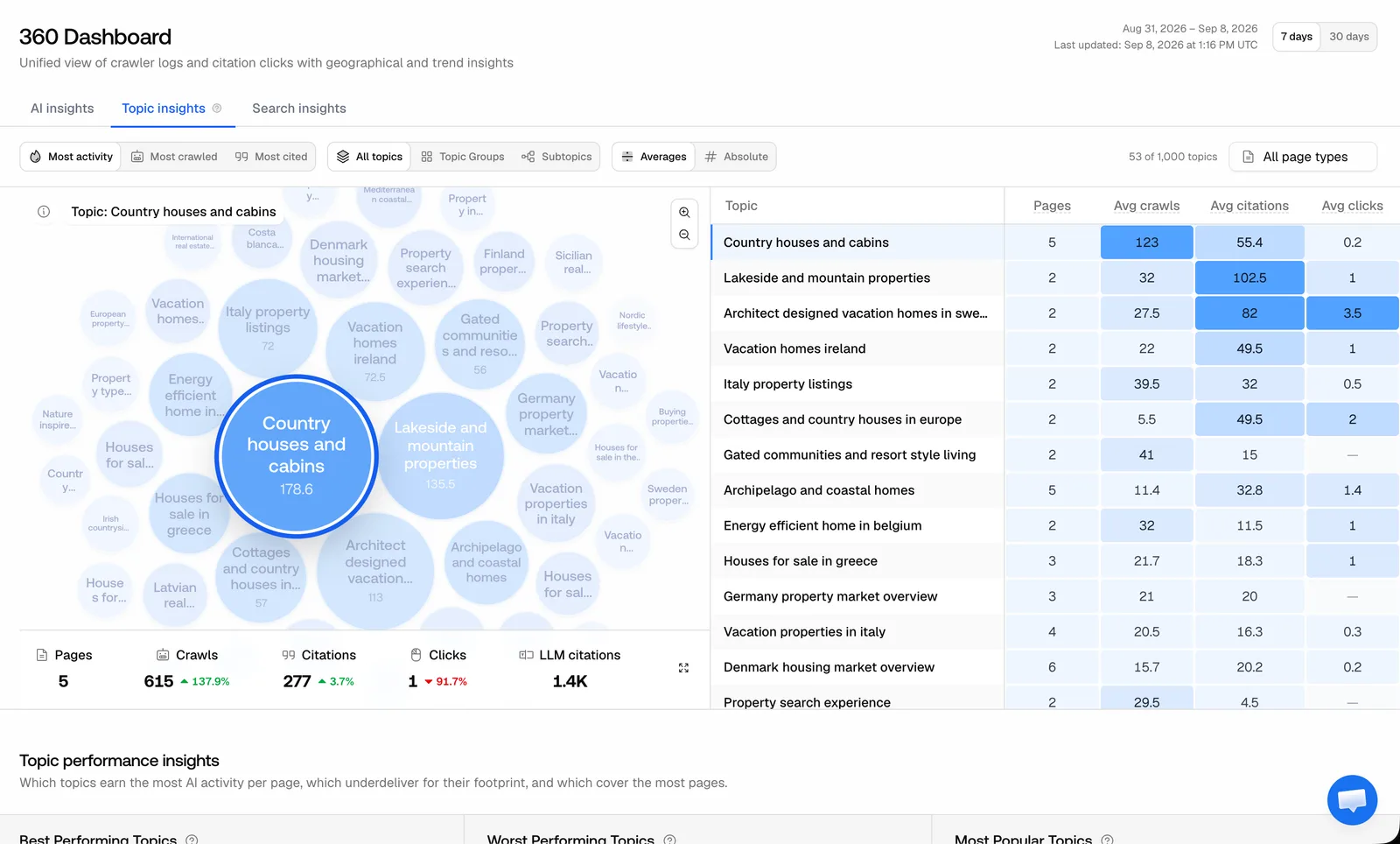 Promptwatch GEO 360 Topic insights, from the Promptwatch changelog (September 8, 2026). Example project data.
Here's what the tab lets you do, according to the Promptwatch changelog:
- Sort the chart by most activity, most crawled or most cited, and switch between averages and absolute numbers.
- Sort topics by pages, crawls, citations or clicks, in either direction (added October 6).
- Zoom from all topics into topic groups and subtopics. A topic group can look fine while one subtopic inside it gets nothing.
- Click a bubble to open the pages, crawls, citations and LLM citations behind it, which takes you from "this topic is idle" to "these are the pages" in one click.
- Filter by page URL (added September 10). The filter narrows the chart, the top topic cards and the topic sheet to matching pages, so you can look at only your blog or one language folder.
- Read the best, worst and most popular callouts below the chart.
Topic Insights got about four times faster on large sites on November 4, 2026, where it used to time out. Since November 6, the Agent Chat panel also opens on this tab and answers from what's on screen, so you can ask it which large topics earn the fewest citations per page instead of sorting by hand.
Two things changed on November 4 that affect period comparisons. GEO 360 now counts search indexers like OAI-SearchBot, Claude-SearchBot and Meta-WebIndexer as AI crawls, and citation crawls are only the bots that fetch a page while answering a user, like ChatGPT-User. Citation crawl totals dropped by as much as AI crawl totals rose, and page categories can shift. If you compare October with November, part of the difference is that reclassification and not anything you did.
These site topics aren't the same thing as the Topics page for prompts, which groups the questions you track and shows whether you're named and cited in the answers. Our guide on citation share by topic covers that one. Topic Insights starts from your own pages. We use both: the prompt view shows which subjects you lose, and Topic Insights shows whether the pages you already have on those subjects are even being read.
Plan check
360 Insights, which includes Topic Insights, is on every paid brand plan: Essential ($95/mo), Professional ($245/mo), Business ($579/mo) and Enterprise. It isn't on the agency plans. The crawl and citation columns come from AI crawler logs, though, and crawler logs start on Professional. On Essential those columns have no crawler data to show, so Professional is the realistic starting point for this kind of review. Agent Chat is on every paid brand plan.
A monthly review routine
Run this once crawler logs have a full month of data behind them.
- Open Topic insights on 30 days with averages on, and read the worst-performing callout first.
- Sort the table by pages, largest first. For each of your ten biggest topics, note whether crawls, citations and clicks are high or low. Most topics will fall into one of four groups: idle, read but not used, used but not clicked, or working.
- For each idle topic, open the bubble and check a handful of its pages for access problems. Promptwatch's Agent Analytics crawler logs show errors per URL with an explanation of the failure, and the Linking page in Site health shows orphan pages and pages with only one or two inlinks. Fix access before anything else.
- For each topic that's read but not used, compare its pages with what people actually ask about the subject. Look at the prompts you track for it, the query fanouts the engines ran, and the pages they cited instead of yours. Then rewrite the pages that should be answering those questions. Content Refresh suggests diff-style updates to existing pages, and AEO articles for new pages start on Professional.
- Switch to absolute numbers and check that a big topic isn't quietly declining behind the averages.
- Write down the date and what you changed. Next month, compare the same topics over the same window.
Expect crawls to respond before citations do. Engines fetch on their own schedule, and a page that's newly reachable still has to be judged useful before it shows up in answers. In between monthly reviews, a quick weekly look at the worst-performing callout is enough.
What this won't tell you
Crawler logs show what bots did on your site. They don't capture every answer that used your page, because engines don't always fetch a page at the moment they answer. LLM citations come from the prompt panel you chose, which is a sample of real questions, not all of them. So treat a topic with zero citation crawls as a strong signal, not proof that no engine has ever used it.
Topic grouping is automatic, too. Before you build a content plan on a topic, open it and check that it holds the pages you think it does.
Where to start
If your crawler logs already flow through a CDN such as Cloudflare, connecting them is the slow part, and the topic view follows from there. Promptwatch runs a 7-day free trial on every self-serve paid plan, including Professional, the first plan where Topic Insights has crawler data to work with. Start it from the pricing page, connect your logs, and read the worst-performing topics once a few weeks of data are in.